Hyperscale IaaS is not any more (or less) as broken in 2025 as it was in 2010, as the design has not changed. The big difference now, is we now have fifteen years of evidence to validate that claim.
This post is a refined version of my original post on this topic a little more than fifteen years ago. Obviously there has been a lot of developments since 2010, however I firmly believe the vast majority of that post still stands true today. Which is why I have decided on a more precise name for this updated post.
When I say broken, I mean that I believe the majority of organizations that use are using it incorrectly. You can use it incorrectly and still get benefits of course, but the downside is you also get higher costs, and generally less availability, which is what I concluded with in my blog post fifteen years ago.
[..]Rather than trying to fit a square peg in a round hole. If you whack it hard enough you can usually get it in, but well you know what I mean.
techopsguys.com Oct 6, 2010
Side joke to myself, this whole new website I created was in part inspired by that blog post fifteen years ago, a little bit ironic in that I end up writing nearly 35,000 words on adjacent topics (everything BUT this) before arriving at this line of thought again.
Contents
What is Hyperscale
I had someone ask me recently what hyperscale was, which isn’t too surprising that many people might not understand what this term means(or at least what I think it means). So I wanted to define it so that people can see how all of these posts apply to that specific theme.
Wikipedia defines “Hyperscale computing” as
In computing, hyperscale is the ability of an architecture to scale appropriately as increased demand is added to the system.
This typically involves the ability to seamlessly provide and add compute, memory, networking, and storage resources to a given node or set of nodes that make up a larger computing, distributed computing, or grid computing environment. Hyperscale computing is necessary in order to build a robust and scalable cloud, big data, map reduce, or distributed storage system and is often associated with the infrastructure required to run large distributed sites such as Google, Facebook, Twitter, Amazon, Microsoft, IBM Cloud, Oracle Cloud, or Cloudflare.
This may very well be what the term actually means, but as I read it, it is not quite what the term means to me.
What Hyperscale means to me
Hyperscale to me is basically a undefined threshold where an organization crosses from perhaps being just an enterprise, to “bigger than enterprise”. This threshold is very subjective, but for example it may be at least 30,000 pieces of physical computing hardware (includes servers, storage, networking). Just some massive number of things far beyond what 95% of other organizations have in the world, that may be a better way to define it in my mind. However, it is impossible to know for the general public, including myself how much equipment a given organization has which goes back to the undefined subjective threshold. It seems kind of weird to say an organization that has 30k pieces of equipment is in the same league as another organization that has 500k pieces of equipment, and they probably aren’t. But it’s possible that they use similar techniques for operation.
I don’t think the Wikipedia definition regarding Hyperscale makes sense when it says the architecture has the ability to scale appropriately based as demand is added, because you really need to define “scale”, which isn’t defined other than make vague references to several large companies (which is what I would do as well), however my point is to indicate the level of scale, rather than the architecture behind it.
Another way of thinking about it perhaps is there are many IaaS providers out there that are not hyperscale. They have capacity to add for customers on the fly when they need it, but they operate at a lower scale. You may not be able to go to them and order 1,000 servers right now for example(very few customers as a % of the market would need that), compared to the biggest players where you probably could do just that.
Also never forget that hyperscale companies can run out of capacity themselves, it’s happened many times, usually such conditions are brief, depending on the situation.
IaaS: Hyperscale vs On Prem
See this page for further info on that topic.
Hyperscale IaaS: A marketing problem, not a technology problem
As I mentioned fifteen years ago, and still believe today, the problem isn’t with the technology itself. I am perfectly fine with how the hyperscale IaaS providers offer their capacity to the world. However I do believe the number of use cases for the technology is implemented by hypercalers are few and far between.
So for me, and for any workload I have supported over the last 25 years, hyperscale IaaS is a technology problem. But it’s not my problem because I realize what it is supposed to be used for, and I chose not to use it for my workloads, as it is unsuitable.
Hopefully that makes some sense…
Instance Sizes
Fixed Instance sizing
It makes sense to some degree to do what they do in that they carve up their systems into cookie cutter pieces as(I expect/assume) so they do not over subscribe their systems, not allowing one customer to consume more then their share(what they paid for). It’s also less complex especially at a larger scale.
Stranded Capacity
That said, I really hate, deeply hate the fixed instance allocations that are provided by public clouds. Because you will almost always end up with tons of what I call at least(unsure if this is a common term) “stranded capacity”. Stranded Capacity in this case at least, means that you have CPU/Memory/Disk capacity on VMs that are being wasted because the workloads on those VMs aren’t using it all(and it is not possible to “lend” that capacity temporarily to another system to use). Basically wasting money, and the situation only gets worse the more systems you have.
Real world example from a tiny social media company I was at (See “My Cloud Journey“) from August 2010, this may be an extreme example to some folks but I suspect this is more common than many may realize. You can see my analysis from that time in this pdf.
- 2,800 EC2 Compute units provisioned
- 7% average CPU usage
- 3,700 GB Memory provisioned
- 2,500 GB Memory used (67.5%)
- 77TB of EBS Storage provisioned
- 4.4TB EBS Storage used (5.7%)
- 287TB Instance storage provisioned
- 6.7TB Instance storage used (2%)
Say you need a VM with 64GB of memory, but that VM only needs 1 CPU core and 10GB of disk space. Good luck finding an instance size on a hyperscaler that fits that profile. More likely you end up with maybe 8+ CPUs, maybe a TB or more of disk space, so you have 7 CPU cores and 98% of your disk space sits unused as a result. Can go the other direction as well, there’s just so much wasted stuff happening. I took the two slides from my blog post before to fix the wording a bit and make it prettier.
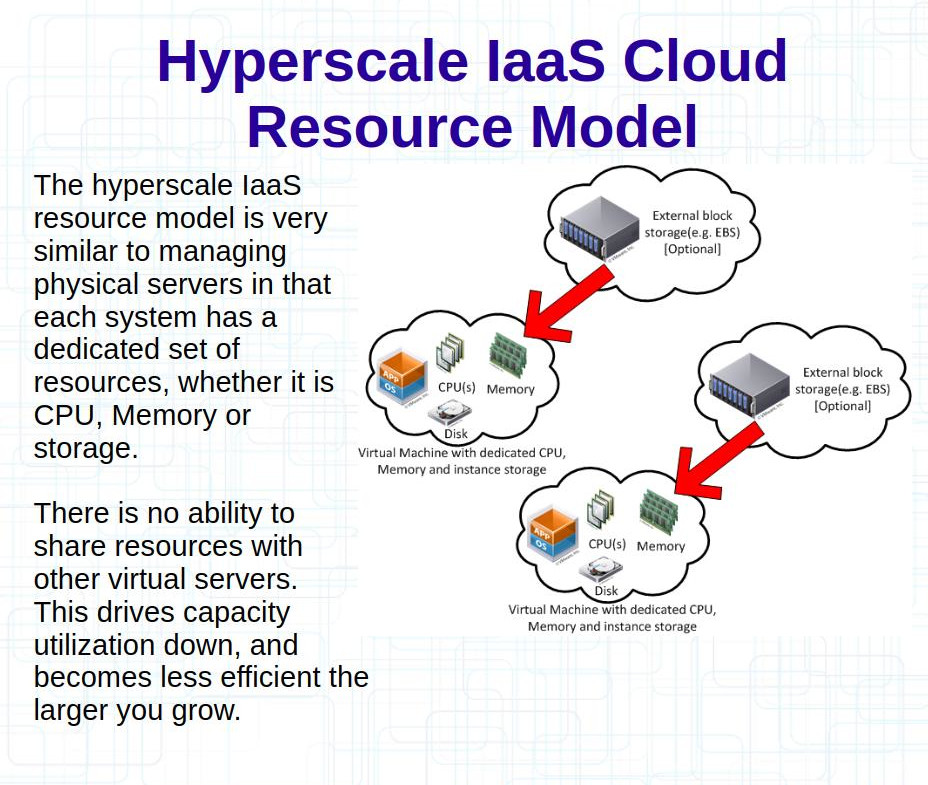
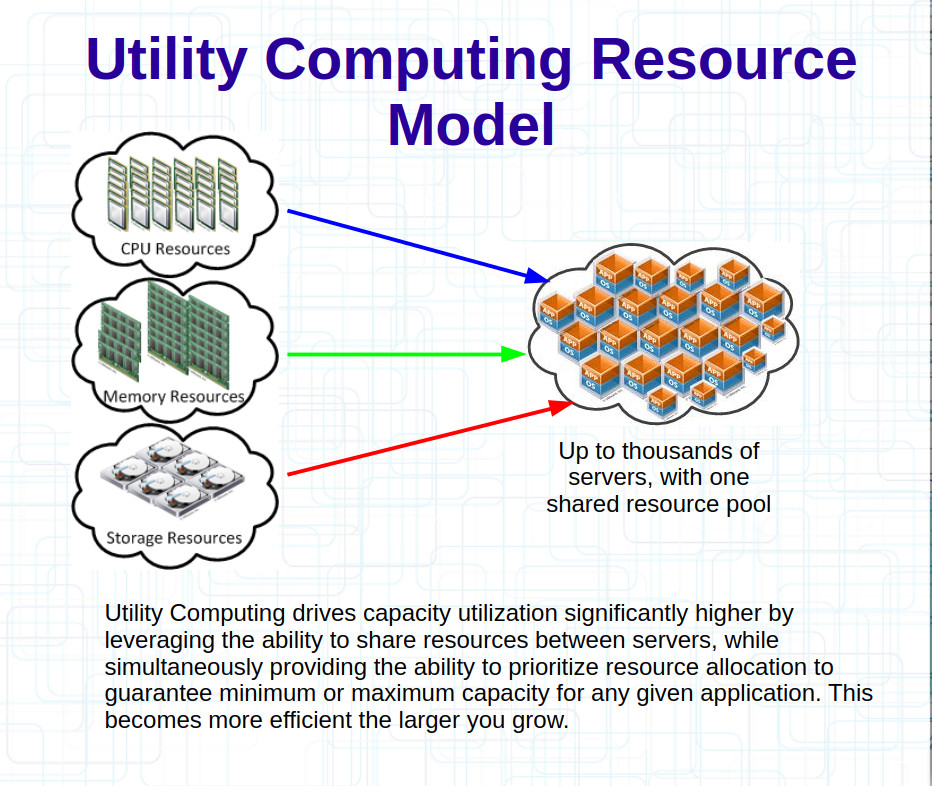
Running servers for almost 30 years myself, everywhere I look I see most systems using less than 10% of their CPU on average most of the time. Disk I/O is similar, disk space too to some extent. Memory usage is really the only one that doesn’t go down much, almost every environment becomes memory constrained long before CPU, because memory is always in use, it may not always be reading and writing but there is always data in there for applications, and if not for applications then often for file system caches etc.
Dynamic Instance Sizing
In an ideal world(IMO) you are allocating raw resources, so say 10Ghz of CPU, 100GB of memory, 1000 IOPS of disk performance, 10TB of space. You can then take those pools and allocate them to whatever your want as long as the aggregate does not exceed the values you are paying for. That is how “on prem” works in a Utility Computing model. Doing this right, does require extra software/overhead on top to do the calculations and hopefully the calculations are right(this capability is built into the hypervisor software). There is a higher degree of risk perhaps that the calculations are wrong and you get more disruption with competing workloads. I haven’t personally experienced this on my on prem vSphere environments, and I have had the vSphere systems successfully throttle systems that exceeded their thresholds on many occasions, but it’s no guarantee that it will work as well with a lot more stuff going on. 99% of the time for me, such thresholds are never met and the systems never need to respond, I can, and do safely oversubscribe without any negative impacts. I just be sure that there is sufficient capacity in the system as a whole, and that’s never been an issue.
Thin end-to-end
Being “on prem”, almost six years ago I adjusted the standard of how I deploy new VMs in my environment, we were in the midst of switching from Ubuntu 16 to Ubuntu 20, which for us meant we were going to rebuild every single VM. So I decided to change a few things. One of those things was to fully leverage(for the first time) thin provisioning and thin reclamation end to end, which was made possible by the newer version of VMware hardware compatibility(we were late moving to the newer version) combined with LVM, filesystems mounted with the “discard” option, thin provisioning at the hypervisor, VMFS-6 with auto reclamation enabled, and at the storage system. I think that is a total of six layers of storage for true end to end.
So as a result, by default, every single VM got a 1900GB virtual disk attached to it. The provisioning process used LVM to create a 10G root filesystem, and a 1G swap filesystem, then another 1G boot partition. So at most, 12GB used by default, but 1,900GB available. If you needed more space you’d just lvextend and add more space, then resize the filesystem online. For some special purpose servers we used XFS and/or ZFS as well as ext4, and the provisioning system carved out logical volumes for those as well if configured to do so.
If you were to provision an AWS EBS volume of 1900G, and attach it to your VM, you would be paying for that 1900G regardless of how much space you are actually using(unless things have changed since last I looked, I assume you could allocate a smaller EBS volume then grow it over time online, but that is another step you need to take, and I’m assuming thin reclamation is not possible, that discard on the filesystem does nothing to free space on the underlying block storage). Not to mention how much space may be wasted in your local instance not being fully used(obviously instance storage you are charged for everything no matter how much/little you use as well). vs the Utility Computing model, what I am using, I’m only going to be using 12G to start(at most, realistically quite a bit less as it won’t be allocated up front, and for the most part when things are deleted they will be released from the back end storage automatically with discard from the filesystems and from LVM), and if I want to add more, I don’t need to touch the hypervisor, the storage system, don’t have to touch any APIs, or anything. The space is there ready to use, until it’s used it doesn’t cost a cent(that remains true even without thin reclamation).
I first started using thin provisioning back in 2006, years before thin reclamation was possible, and file system thin reclamation came later still(as did reclamation with lvm). Thin reclaim from Linux on vSphere (through VMFS) came even later than that. I recall using thin reclaim on Linux in vSphere using raw device maps(RDM) to work around that limitation in the earlier days). I spent a LOT of time in those early days optimizing my storage layouts to maximize efficiency.
CPU Cycles stolen
I do recall during my brief stint while using AWS at least, this wasn’t very stable. In that there is a Linux utility called System Activity Reporter(SAR), and when it monitors CPU usage, one of the metrics it reports is “% CPU Stolen”, which the manual says means
Percentage of time spent in involuntary wait by the virtual CPU or CPUs while the hypervisor was servicing another virtual processor
Basically you’re losing out on what you paid for. I do recall that metric ticking up quite a bit on many occasions while running VMs in AWS. I don’t recall to what degree, in the end it wasn’t a huge deal but the point was there wasn’t complete isolation that is implied when you are allocated those fixed resources for your VM. I don’t know if it is still a problem today or not.
In the VMware world, there is a metric at the hypervisor level called “CPU Ready”, which the documentation says means
The VM requires CPU resources, but none are currently available, so it has to wait for another CPU cycle.
There is another, similar metric called “CPU Co-stop”, both of these are often used to gauge effectiveness of over subscribing CPU cores in a virtualized environment. Myself, I have always made it a key point to basically always have those metrics at 0, and my monitoring shows that is the case 99.9% of the time, it’s really never been a problem as long as I can remember because I am super conservative how I allocate CPU cores. I have never noticed the “CPU Steal” metric ever go above 0% on my VMware environments. Unsure if it’s just because nothing is ever stolen(more likely), or maybe things just work differently.
Not for traditional Mission Critical
Fifteen years ago I said all you have to do is look at their SLA to rule out such hypercale IaaS systems for any traditional application stack that is mission critical. This is still true in 2025, the world witnessed first hand the number of organizations that had outages as a result of the us-east-1 failures in October 2025.
Design flaw caused October 2025 us-east-1 failure
If you think what happened to us-east-1 in October 2025 was a bug, or a “race condition”, I have a bridge to sell you somewhere… That is not what happened, what happened was they have a critical design flaw in which a single entry in a DNS zone(or lack thereof, in this situation, we’re talking something like 60 bytes of data here) has the ability to hamstring a half dozen data centers(availability zones). When organizations plan for data center failure most often it is natural disaster related. Everyone should be asking themselves, what other critical design flaws are in the hyperscale provider’s systems(all providers not just AWS). In the case of AWS there have been reports of centralized control planes existing in us-east-1(IoT Core, Elastic Load Balancer, NAT Gateway Provisioning, Redshift Cluster operations, perhaps more/less) which can result in outages even for multi region customers(in some situations) due to their broken design. Because for any regular data center, DNS doesn’t matter, there are no complex software things that can break that will cause similar issues as it does with a hyperscale IaaS provider. Individual customers in such data centers may opt to have very complex systems that may be susceptible with similar design flaws, but if they go down, doesn’t affect anyone else in the data center. At the end of the day, data centers are about providing power, cooling, and network connectivity. Relative to IaaS services, these three things are quite simple to provide and in general are very mature technologies not changing at a rapid rate.
Built to fail
This is a term I came up with fifteen years ago (or maybe I got it from someone else, I don’t remember) to signify that the underlying infrastructure cannot be trusted. The hyperscale data centers are purposely built to lower standards for cost purposes. This makes a lot of sense at hyperscale as you have a large number of distributed systems and can handle failure easier. Hyperscale implies you need that much capacity regardless might as well distribute it amongst facilities. Losing a data center is like losing a rack if you are at a smaller scale. The cost benefits of this strategy fall apart at smaller scale though. They also fall apart at a larger scale if you are using a 3rd party IaaS provider to provide the infrastructure. You may have solved the availability dilemma at large scale with hyperscale providers but you will be paying way too much money to make it worth while vs doing it yourself, as you can see in some examples here.
You must leverage the entire system
I said traditional then and I say it again now. If you are not designed to leverage the entire system(multi regions minimum, best case scenario) then you are using IaaS incorrectly and honestly you should get out, if you care about costs and/or availability. But that is of course obvious to most, and everyone should know why many customers(including Amazon Alexa mind you) did not design to leverage the entire system.
The crazy bit is though, if you do leverage the entire system your costs go through the roof anyway, so you lose regardless.
It’s been well documented for over a decade that at least us-east-1 has some serious issues at times, in 2012 there was multiple days of downtime for some customers, including the company I worked at(I was long gone, and already moved my next employer out of AWS by the time that outage hit). Organizations making conscious decisions to not make their applications multi region and or multi cloud. Which again, I predicted fifteen years ago as that is very difficult and expensive to do, so it makes a lot of sense to me that many would not want to incur those costs. Even more reason, to get out.
Sometimes driven by development
(Side note: I think this was the situation with organizations like Dropbox and 37 Signals)
I’ve worked closely with developers for the last 25 years on endless different things. I find it somewhat common in these past 15 years for developers to be more into “cloud” than more “traditional” ops types folks like me. I don’t blame them from a conceptual standpoint it can make their lives much easier(initially anyway) if they are doing the work. So it makes a lot of sense.
The problem arises when you start to get to spend real money, MOST developers really don’t know much of anything about real operations(cloud or on prem). I can count on one hand the ones I have worked with that were great at operations. Some really think they do and make bad decisions as a result, though I’d say a decent majority of them admit their ignorance and let the experienced people control things. I’m exactly the same way, I’d never tell a developer how they must do something. I will occasionally suggest, or urge them that we(ops) needs XYZ, and suggestions on how to accomplish that(but maybe they have a better idea on how to accomplish the end goal). Internals to the application code I stay far away, not my realm.
Costs are out of control
You can see my personal experience with cloud and the costs associated with it here, and you can see several examples of both small and very large organizations deciding to get out of public cloud here.