Contents
- 1 Introduction
- 2 Storage Array acquisition
- 3 Fast Forward to 2010
- 4 April 16, 2010
- 5 Storage Array down hard
- 6 April 16, 2010 23:48 Pacific time
- 7 Recovery was only just beginning
- 8 Restore from Tape
- 9 What about the logs from the front end
- 10 NAS Online and all systems restored to full operation
- 11 What about the future?
- 12 Root cause of the storage array failure
Introduction
This happened fifteen and a half years ago now, and the company I was at went out of business a decade ago, so I figure no harm in writing some in depth information, it will add some useful background about myself in a way, sharing one of the few truly scary large scale outages I have been a part of over the past twenty two years. Also to show that not everything is perfect, not even the stuff I build. But what was more important to me was less about the outage itself and more about how the vendor handled it(and of course how I handled it as well). In short, I can say I remember this much at least – I felt it was the best support experience I had had in my career to that point anyway(Nothing had even come CLOSE to that experience). As a result, my support for the platform really didn’t waver much, but I still learned a lot.
The official outage duration for the storage array itself was April 16, 2010 23:33 until April 17, 2010 04:05 Pacific time.
Storage Array acquisition
In 2008, right as the economy was crashing I suppose, the company I was at (I’ll just call it “BIZ1” as I have in other article(s) to make it simple) was on the market for a new storage system of some kind. At that point they were using a BlueArc NAS platform, along with some crappy back end LSI storage that came with the BlueArc. We evaluated several options but it really came down to two real contenders:
- 3PAR T400 Dual controller (quad controller capable) SAN storage array with 150TB raw SATA disk space(200x750GB) for the SAN, along with a two node Exanet NFS cluster. (This was well before 3PAR was acquired by HP) for about $630,000(for the combined solution)
- Hitachi AMS 2300 SAN storage array with ~120TB mixed SAS/SATA(60x400G 10k, 100x1TB SATA) BlueArc NFS cluster (this was prior to Hitachi acquiring BlueArc) for about $598,000 (they later replaced AMS2300 with AMS2500 I don’t see that pricing)
The Hitachi AMS2000 storage platform at the time was JUST entering the market, and in fact the top of the range AMS2500 was not yet released, IMO that was the only option worth considering, but Hitachi was unwilling to present that as an option(I explicitly asked them to) until the last moment(IMO a better vendor would have put that product forward with the caveat that it is not shipping for a couple of months yet). In an ideal world I would have gone for a 3PAR T400 with a BlueArc NFS cluster(in part because both systems have unique hardware acceleration) but BlueArc was unwilling to do that(3PAR had no problem with BlueArc connecting to their system).
We went back and forth quite a bit but it was pretty clear to me that Hitachi/BlueArc were playing defense quite a bit, their AMS2300 wasn’t up to the task(again, till the last minute when they swapped it for a AMS2500). One bit was they were relying on auto tiering which I never had much confidence in even on 3PAR. I felt a single pool of 200 disks working as one(3PAR architecture doesn’t dedicate any disks to sparing, nor do they dedicate any disks to parity. All disks run the workload) would be better and more consistent performance than two tiers of disks(with dedicated parity and spare disks on top).
I don’t recall all of the details, but I was told by my manager later on, after HDS/BlueArc lost the deal, that Hitachi had emailed my VP and saying they would be happy to do business with our company assuming I was no longer going to be employed there(I got a good laugh out of that, side note Hitachi was known for literally bribing customers even in the U.S. to become customers, part of Japanese culture apparently). I was myself with them, honest and blunt ? Their techs could not handle my questioning. I remember at one point during their sales presentation they had extremely high performance quoted for IOPS on the platform. To me this was kind of a red flag(it was something like a million IOPS), it really screamed “these IOPS are coming from cache only”. I challenged them on that topic and they admitted, yes those numbers were cache only.
Honestly their last proposal wasn’t bad(from a tech/performance standpoint), but I don’t remember the pricing. As a 3PAR customer at my previous company already, I really did want 3PAR again, everyone knew that. I had plans for the storage above and beyond NAS-only(including MSSQL, which to that point the company was literally running MSSQL over SMB over BlueArc but if you breathed on them hard they went down – also VMware which we had not yet adopted). I felt the 3PAR architecture was far better than AMS2000 by a wide margin(which appeared to be mostly incremental changes from their earlier platform).
So the deal was done, and we got the 3PAR T400 with Exanet cluster. Exanet had been shipping since 2003(though I wasn’t aware of them at the time, but I wasn’t too deep in the NAS space to begin with), that had partnered with 3PAR (and other companies). 3rd party NAS platforms were still a thing back then, though their numbers were sort of dwindling a bit by 2010. I had no knowledge of them till we met. They made big claims, some were pretty accurate, others were not.
From what I recall, performance on the new 3PAR/Exanet system was significantly better than the older BlueArc with LSI back end platform, I believe primarily due to the performance of the 3PAR and it’s architecture itself(how much I/O could be extracted from the disks with wide striping), though I’m sure the Exanet helped some too.
(Side note: looking back at my email archives we had quite a few performance problems with our existing BlueArc systems, but I felt at the time it wasn’t the fault of BlueArc itself rather the LSI back end storage, I think they agreed which is why in their formal proposals they only presented Hitachi has an option not the LSI that we had, which ironically I think is a similar story to Exanet if you bought Exanet without an enterprise storage you’d get the same crappy LSI storage, Exanet techs talked a lot of crap about LSI that they shipped(compared to 3PAR especially). That and we had a major outage (see link for details) following a software upgrade that kept a BlueArc system down for a good dozen hours or more, their escalation procedures were weak, till now I had forgotten about that outage so BlueArc was on thin ice for us already when we went to refresh a few months later, didn’t help that our company was cheap and none of our 3 BlueArc systems were configured in a cluster so each was a single point of failure).
Overall the new 3PAR/Exanet solution worked very well initially. The biggest pain point was Exanet claimed to support thin provisioning when they did not. I had over provisioned the storage array up front and was soon facing the reality that we will run out of disk space soon because the Exanet was not efficient(much like any system it chose to use “free” space first rather than re-use space from deleted data, and had no support for “thin reclamation” which is the method to “release” deleted space on the back end disks so it can be re-used for other purposes).
Fortunately 3PAR is very dynamic. I leveraged a feature called “Dynamic Optimization” to change the RAID levels on the 3PAR volumes on the fly, from I think it was RAID 5 3+1 to RAID 5 5+1. Over dozens of terabytes of space, on most storage arrays at that point if you needed to do that you had to do a data migration. Not with 3PAR. I ran this process 24×7 literally for about 3 months, there was no noticeable impact to anything. I got the volumes converted in time and we did not run out of space. It would have been expensive to run out of space, at that point we were at the addressable limit of two storage controllers(they later increased that limit by about 30% I think the limitations were mainly how 3PAR virtualized disks into 256MB chunks at the time and just the memory required to manage all of those items. This virtualization allowed them to do data manipulation without data migration), so we could not add any more disks without adding two more storage controllers which was not cheap. Later in the lifecycle of the system(forgot exactly when, but it was before this outage) we did in fact add the remaining two controllers and a lot more disks to the system.
Some pictures of the 3PAR T400 system that we had. The Exanet was simply software running on top of some IBM x86-64 rack mount systems, nothing neat to look at by comparison.
You may be able to see the steel plate below the 3PAR, at one point in order to add more capacity we needed to distribute the weight across a larger area due to weight restrictions in the high rise tower we were in. So we took downtime for a day and dismantled the array, had the steel plate installed, then moved the cabinets onto the plate and re-installed everything and powered everything back up. I say we, as the customer we handled the shutdown of all connected systems to the array, and 3PAR handled all aspects of physically handling the array(customers generally were not allowed to do physical things to the array itself in normal operation, that includes things like software updates as well, support did everything). The one thing customers could do any time physically was connect or disconnect hosts to the system(iSCSI or fibrechannel).
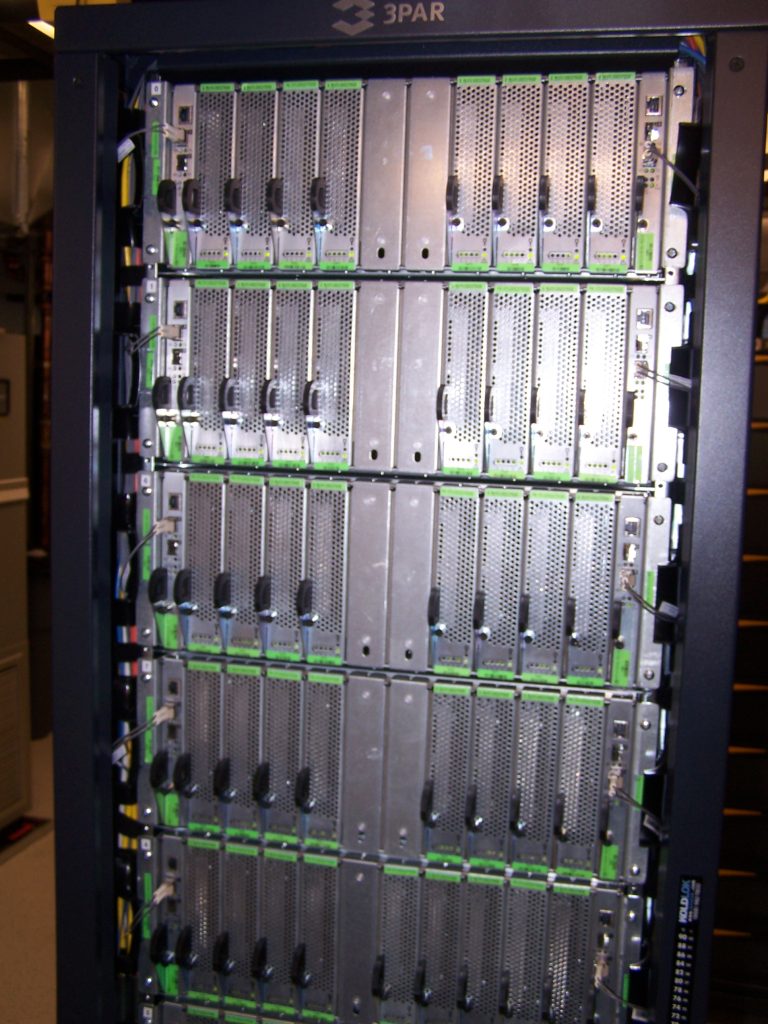
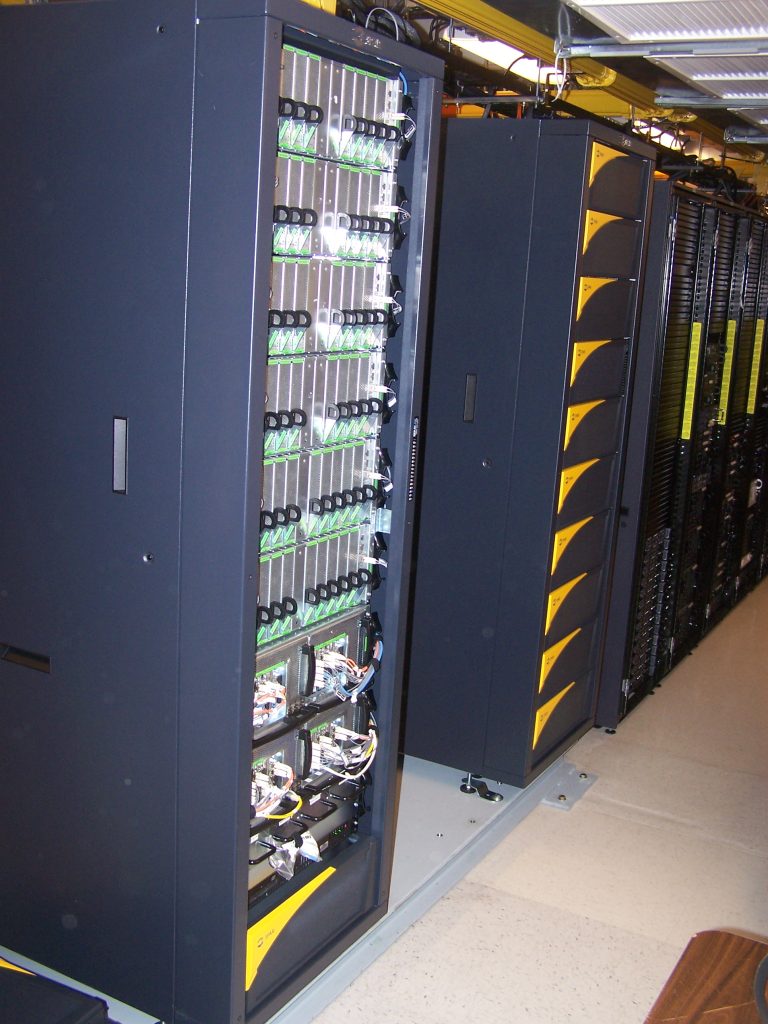
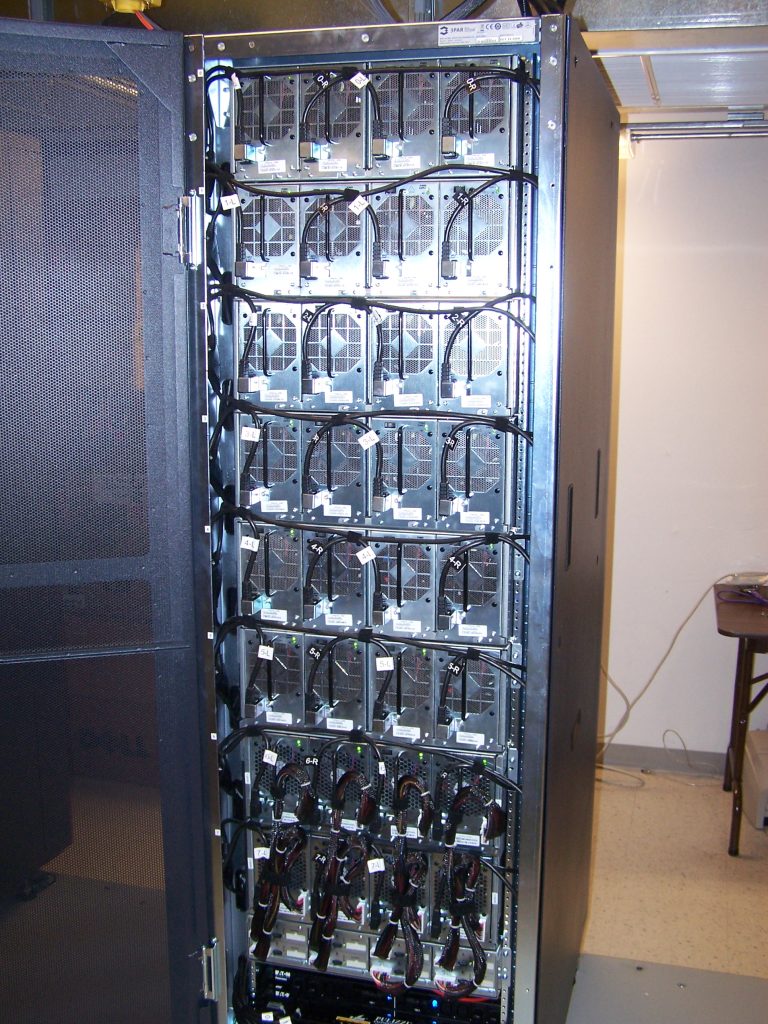
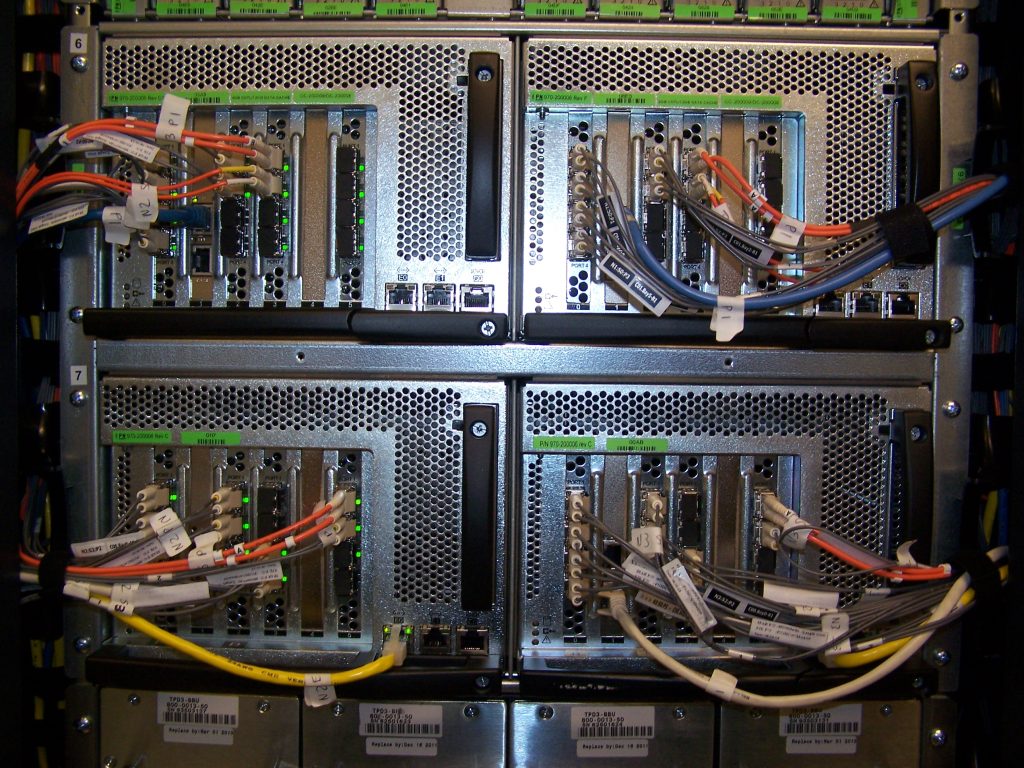
This was by far the largest 3PAR system (physically), and largest single storage system overall that I have ever had my entire career.
While there were four storage controllers at the time of the outage, each disk in the system was only wired to talk to two controllers. I think drives at most are “dual ported” so there was no way to get a drive to talk to more than two controllers.
Only one storage system
You might ask, why only one storage system? Why not a second system as a backup? Well there is only one answer and it’s what you may think: not enough budget.
Fast Forward to 2010
… and everything is smooth sailing, I was actually thinking how amazing it was that we hadn’t had a single disk failure since we got the system. Our workload pushed the drives VERY hard, 7200 RPM disks were getting well in excess of the recommended IOPS set by 3PAR engineering, which I think was they said something like 75 to 90 was their certified level, I was peaking at 110-120(later learned they didn’t like that, and they essentially were forcing BIZ1 to buy more disks or risk losing support as I was on the verge of quitting my job there later in 2010), but the data on the latency showed no issues. So I ran with it.
April 16, 2010
Obviously this day started out like probably almost any other. Then in the early afternoon I got an alert from our offshore tier 1 ops team saying some of the log files that my log distribution system downloaded were corrupt. That was super strange, and had never happened before. I didn’t know what to suggest other than I told them just delete the files and my automated processes will download them again. This happened a few more times that afternoon and into the evening. Later that night I was logged in and poking around, I think trying to figure out any possible causes for this data corruption, then I noticed it seemed everything related to NFS and 3PAR was down all of a sudden. I could not even ping the storage array anymore. Uh oh…WTF.
BIZ1 System architecture
The application stack we ran had two main components. The front end, which served billions of request to millions of users on the internet everyday from multiple active-active data centers(these had a an uptime Service Level requirement of 99.99%). We also had a back end, this was in the Westin building in Seattle only. The back end was responsible for gathering data from the front end to perform analysis on in order to make decisions and stuff, as well as present reports to our paying customers. The front end systems were always completely isolated, quite a unique design in my career anyway they had no external dependencies. Transaction wise, if any single data center went down front or back end, at least for a while, all other front end data centers would have no impact. Worst case, longer term if there is an extended outage to the back end, the front end would still operate fine, it just could not retain the data locally for an extended period of time and would have to delete older data to prevent the logs from filling the disks.
Second primary storage failure
This was in fact the second primary storage array failure I had dealt in my career to this point, the first was a double controller failure on a EMC Clariion CX600 back in 2004 I think it was. Though I was not the person responsible for that array. In that case the root cause was some kind of software issue, as they did not have to replace any hardware components, but it still took several days to fully recover. I still remember to this day getting those initial alerts, I logged into the HPUX Oracle servers and ran “df” only to see “I/O Error” on several volumes. I copy/pasted that output and send it to our “production emergency” email alias. Our DBA later told me he was driving on his way to lunch, I believe it was a Sunday afternoon. He said when he read the email he almost got into a car accident. Our outage conference call lasted at least 20 hours, and still recall at one point the operator from the phone company coming on the line wanting to confirm that the conference call was still in use, which we said yes it was….
The company did not have proper backups of their Oracle database(of course everyone knew that was the case, but again, no budget) so it was especially painful for the DBAs to recover from the data corruption, corruption that we continued to occasionally encounter even a year later.
Storage Array down hard
The array was down hard, I could not ping it. We did not lose power as everything else was online. At this point I figured I should just go to the office and work from there. Fortunately the office was literally across the street, so I walked across the street and sat at my desk. I fired off a few emails to basically everyone. But it was late on a Friday night, nobody was reading email(offshore team was 24/7 though). I decided to NOT wake anyone on my end up. Realistically there was nothing any of them could do, end customer traffic was not impacted, and they are better off getting sleep anyway.
A few minutes later the array came back online, I logged in using the 3PAR GUI management software and saw one of the most scary messages of my career:
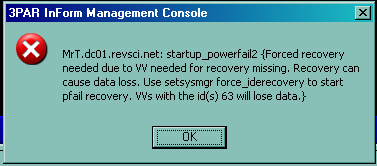
Even now I get tense reading that message again, I had not dug up that screen shot in many years. Note this was just a few minutes into the whole situation, I was already in the process of opening a support case with 3PAR.
April 16, 2010 23:48 Pacific time
You can see the raw incident report here. I’ll be referencing it a bit for the exact timeline. Every 3PAR system comes with a dedicated “Service Processor” which is a standalone 1U server which is basically a call home device for the array. 3PAR support has remote access into the system(provided the customer allows this) in order to do things like software updates, support cases, and stuff.
3PAR’s automated alerting was going off at about the same time I was calling them. They immediately engaged their escalation support team to investigate further, and found the error I was reporting. On April 17 2010 at 00:14 they engaged the 3PAR Customer Services Duty manager, and engaged with their engineering team at 00:37.
3PAR engineering inspected the array and found only “virtual volume” number 63 was indicated as problematic(as indicated in the message). I remember them asking me if it was OK to run extended diagnostics on the array, the array would be offline during the diagnostics but would hopefully surface a cause for the problem. I gave them permission and they started the diagnostics at 01:56. At 02:28 the diagnostics completed and they determined that SATA disk number 94 was returning errors. They told the array to shut that drive off and prevent it from being part of the system.
I do recall at one point me specifically asking if the 3PAR CEO was aware of our situation, as their documented escalation policy specifically cites the CEO is kept in the loop after some period of time (I think it was 1-2 hours). They claimed yes the CEO was aware what was going on.
At this point it was time for 3PAR engineering to do a full recovery of the system, which they said would take 40 minutes and require 2 full system restarts. I told them to go for it. This started at 03:20, and was complete at 04:05 and the system was fully online again. Support suggested running integrity checks on everything to see if things were OK. The conference call ended at 04:10.
Honestly I was just blown away by how professional and knowledgeable everyone was on the call. I have never had a support experience like that to that point. I couldn’t rate them highly enough.
Checking my email history I sent regular email updates to everyone throughout the night. You might think maybe management would be mad for not waking them up before, but nobody batted an eye.
Recovery was only just beginning
The array was back online but there was still a long road ahead. I learned that day that 3PAR’s greatest strength, which was it’s “wide striping”, which is distributing data evenly across all resources on the platform for maximum performance, was also a great weakness. Because data corruption on a single hard disk, meant that there could be data corruption across the entire system. Sure enough, while the array was online, the Exanet NAS platform would NOT come online. It would try to start and just crash.
Almost out of options
Now comes a real nightmarish scenario. Our core NAS platform will not start. The obvious thing to do is to engage with Exanet support to get them to help us recover their system.
The only problem was Exanet had run out of money barely two months before and their assets were acquired by Dell. Exanet no longer existed. There was nobody to call. I knew several high level folks with Exanet and worked hard to try to get them to help me but it was quite difficult. Dell made the former Exanet employees promise not to help any Exanet customers on anything, perhaps for legal reasons. Our former Exanet on site engineer was not with Dell though and he knew some stuff.
(Side note I later learned that 3PAR actually had the opportunity to acquire Exanet before they ran out of money and declined. I thought that was incredibly short sighted by 3PAR, as did my Exanet reps. It was really a perfect NAS solution for them, even scaled to 8 controllers(up to 1 Exabyte of storage with up to 128 billion files – Exanet Architecture), like 3PAR did. Apparently 3PAR was somewhat arrogant and didn’t want to get involved with file serving, they wanted to stick to block, or something.. even today Exanet would have been a solid NAS platform for HPE, as HPE has no other platform that can compare)
It was now Saturday morning, April 17, and I had an idea on how we could try to recover the Exanet. We already had a 3rd Exanet node on site to use as a spare in the event one of the other nodes failed. This spare was not operational just blank hardware sitting there(not even sure it worked at the time). My idea was to “break” the existing 2 node cluster, leave the existing cluster as a single node, and build a new 2-node cluster, map fresh storage volumes from 3PAR and extract as much data as we could from the old platform(we were told some tips to prevent the system from crashing while copying data, but we couldn’t get everything, fortunately we didn’t need everything). Much of the data on the NAS was in fact transient log data, the important stuff of which was the NEW stuff, which was still on the front end servers. So I talked with this former Exanet guy who was at another support company and he worked with his CEO to come up with a plan. He was already going to go to another customer’s site on Monday for something. He could cancel that trip and come to us instead, bringing more hardware to ensure he can get the 3rd node online and form the new cluster. The only thing they required was us to sign a 1 year support agreement, along with some fees for doing the actual support work. Total cost was $12,000 (see link for actual quote). To me that was super cheap given the situation they could have charged us $150k or something. Though my VP was not happy with that bill, his words were “they really rake you over the coals in situations like this..”. I was at a loss for words, WTF man these are the only people on the planet that can recover this system and they are offering to be on site to do the work DAY AFTER TOMORROW. He signed the quote.
In the meantime we started bringing everything else we could back online, including SQL databases and other things on the SAN, after some file system checks most things came back without an issue. However some things did not.
Restore from Tape
I think it was in 2009, I had a project to handle backups, and to do backups we used LTO tape. We could not/would not back up EVERYTHING as there was too much data to backup and not everything was important. Part of this project was going around asking everyone what they wanted to have backed up. I put it all on a list, and made sure it was backed up. We backed up everything that was defined in the job to two different tapes each week. One tape stayed on site, the other tape was sent off site. I didn’t want to have to wait for a tape delivery to do something unless it was a last resort.
So, we are in a disaster recovery situation, a bunch of data is still missing(may be recoverable from NAS but we aren’t sure yet). So people start sending me requests to restore data. I go about doing that, however several things cannot be restored. Why is that… oh yeah… it’s because they never told me to back those things up. You don’t tell me this should be backed up, I don’t back it up, means I can’t restore something that doesn’t exist..
But everything that they wanted that WAS backed up, was restored, there was zero complications doing that.
What about the logs from the front end
As mentioned above, in the system architecture for BIZ1, our application stack had a bunch of log files that were stored by the front end, that needed to be downloaded to the back end. I actually was quite proud of the system I built, vastly exceeded my expectations and did a wonderful job. We were using a commercial product called “Repliweb” which was setup years before I started. It did the job but was a bit complex to manage, and encountered problems from time to time requiring manual intervention. My new system, I mean it even blew me away. It never really had an issue, any issue it had it auto recovered from. You can see my fancy Visio diagram for the design here. It was basically a bunch of bash scripts, using Rsync over a special patched version of SSH called HPN-SSH (It wasn’t hosted on Github in 2010, assuming Github was even a thing in 2010), where I was able to disable the encryption for the data transfers dramatically speeding up the process. Encryption remained on for authentication, and there were a few other minor tweaks but the encryption for data transfer was the biggest performance benefit for transferring terabytes of data per day(aggregate). Before my system, they sent all logs over site to site VPNs, and we frequently ran into VPN bottlenecks. My system sent them over the raw internet. The data in the logs was pretty generic nothing sensitive so not encrypting them was not an issue.
As you can see in the diagram, there were ten load balanced SSH systems where the logs came into(of course they all shared the same SSH key so clients didn’t know the difference), they were hooked into the Exanet(which was offline). My temporary solution was once again to leverage the virtualization ability of the 3PAR platform and directly allocate SAN LUNs to some of these rsync systems, so that the edge servers could resume transmitting log data to the back end, to be stored temporarily on the SAN, until the NAS was online again, then I’d move the data to the NAS for the back end data processing. I thought the solution was quite awesome and it worked perfectly. No lost data from customer transactions(that I recall anyway). Log data from the previous day was still on the edge, so everything from before the outage even started was still there, but wouldn’t be there beyond say 48 hours.
NAS Online and all systems restored to full operation
After checking my emails from that time, on April 21 we got the original NAS to a semi stable state and was able to start recovering data from it at a higher rate of speed. I don’t see an email what day everything was declared good, but I’d have to guess by April 25-28 or so, everything was back to normal. I do see an email that I nuked the original Exanet cluster volumes on May 11 2010 (see link for image from my custom cacti 3PAR monitoring disk space).
What about the future?
We could not stay on Exanet forever, while everything was fine for the moment it was clear there was no long term solution to using it. Dell wasn’t yet interested in releasing any Exanet-based products (I think they did at one point, but didn’t allow 3rd party array integration). So I started thinking about alternatives. The most obvious one that came to mind was NetApp V-series, which was a NAS-controller ONLY version of NetApp, where you connected it to 3rd party SAN storage. They integrated with several platforms, 3PAR included.
We purchased the NetApp V-series, I don’t recall the model number, I assume we had discussions with NetApp and told them what we do and they suggested what we should get, I don’t remember. I do remember doing initial setup on the NAS, and wow it was different than what I was used to (not in a good way). I was never fond of NetApp back then for performance reasons(they had a lot of nice software features), and for efficiency reasons(WAFL was terrible for efficiency). Though to that point I had zero personal experience with NetApp. I did know a former employer of mine deployed full sized NetApp arrays for large scale Oracle DB using NFS and it crashed hard. But worked fine with fibre channel(they ended up being a huge NetApp customer with dozens of arrays and for some reason required a full time NetApp employee on site). But I was optimistic things would be fine. Fast forward a bit, and I decided to leave the company quite suddenly after getting annoyed with management, I documented that in my “My cloud journey” page. I never got to see the NetApp V-series take production load.
But I was in touch with my 3PAR rep at the next company and he knew what was going on. Apparently they did switch over to it, and the NetApp failed hard. Not actual offline failure, but it could not handle the workload, the CPUs went to 100% and performance was absolutely terrible. This was about the same time HP acquired 3PAR for $2.3 Billion. HP went to BIZ1 and said “give us your business we’ll handle everything end to end”. HP had their own scale out NAS platform(based on their acquisition of Ibrix, I have no idea how that platform is though didn’t have high expectations, and HP later abandoned the platform for NAS workloads, instead keeping the technology as a storage layer on their StoreOnce backup platform). I don’t know what happened after that, if BIZ1 went with HP or if they did something else.
(Side note: in the midst of the recovery of the systems late on April 17 I recall an internal conference call with basically everyone on the tech team up to the CTO. We were discussing the situation, what we should go forward with. Only one part of the call stands out to me though, the CTO actually suggested “Why don’t we just migrate to FreeNAS?” I was at a loss for words, just like huh, are you really suggesting that, what an incredibly stupid idea(in my head of course). With our data throughput requirements and stuff FreeNAS would be a terrible option I had no doubt. The idea died there, it was never raised again).
Root cause of the storage array failure
After all of that you may want to know what actually caused the array to fail in the first place. As best as anyone could determine, the problematic Seagate 750GB SATA enterprise disk number 94 was silently corrupting data, during the night of the outage, the full array diagnostics determined that when you were to WRITE data to this disk and then try to READ it back, the data was corrupt. They sent the drive to Seagate for analysis but Seagate found no problem with it, the drive was on the latest firmware at the time.
Why did this cause the array to crash? Well part of it was perhaps a software bug in 3PAR, another part of it was what you could probably say a design oversight in the architecture of their systems.
When the corruption got bad enough, one of the controllers encountered an unrecoverable error, then crashed and rebooted. All disks automatically switched to the remaining controller, then it too encountered the same unrecoverable error caused by corrupted data on disk number 94, and that controller crashed and rebooted as well. This process repeated a couple of times, then some kind of internal counter tripped and the system realized something very bad was happening, and it halted itself entirely in a safe way waiting for manual intervention.
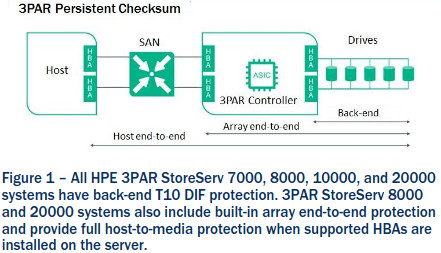
The design issue(IMO), was that up to and including that 3rd generation of 3PAR architecture, they did not have end to end data integrity protection. This kind of protection really isn’t advertised much at all in the storage industry even today. I don’t know how many systems have it(honestly have been rather disconnected from the industry for almost a decade now). So the system was unable to detect the corruption so when it hit, it couldn’t handle it.
I’m sure they knew of the design oversight, as they corrected it in their 4th generation platform that was released what looks like in December 2012 starting with their 7000-series mid range platform, and I think later their V-series platform. From when the data enters the system on either Fibre channel or iSCSI, through the controller stack, to the back end ports, to the back end disks, there was checksums end to end.
They improved this further still in their 5th generation platform that was released in September 2015, extending this T10 data integrity protection all the way out to the hosts and storage network as well(at least for fibre channel, unsure about iSCSI). They do this without any special drivers, agents etc.